

ControlNet NSFW Guide 2026: Master Exact Poses in Stable Diffusion
ControlNet is the most powerful tool for Stable Diffusion users who need exact control over character poses and body positioning. If you create NSFW content, you already know the frustration of random poses and broken anatomy. ControlNet solves this problem completely by giving you precise control over every joint and limb position.
This guide covers everything you need to know about using ControlNet for NSFW pose generation in 2026. We will walk through OpenPose, Depth maps, Canny edges, and multi-ControlNet workflows in both ComfyUI and Forge. By the end, you will generate consistent, anatomically correct poses on demand.
What Is ControlNet and Why You Need It
ControlNet is a neural network extension for Stable Diffusion that adds spatial control to your generations. Without ControlNet, Stable Diffusion guesses poses based on your text prompt. The results are unpredictable and often anatomically wrong. With ControlNet, you feed the AI a reference image showing exactly how the body should be positioned, and the AI follows that structure.
The technology works by creating a copy of the Stable Diffusion model and training it to understand spatial conditions. This copy learns to read pose skeletons, depth maps, and edge outlines. When you generate an image, ControlNet injects these spatial instructions into the diffusion process, forcing the AI to respect the body structure you defined.
For NSFW creators, this means you can finally get the exact poses you want. No more random arm positions. No more broken hands. No more bodies that look like they were assembled wrong. ControlNet gives you the precision that text prompts alone cannot achieve.
Installing ControlNet in 2026
Forge Installation (Automatic1111 Alternative)
Forge is the recommended interface for ControlNet in 2026. It handles ControlNet more efficiently than the original Automatic1111 and supports newer models better.
Step 1: Open the Extensions tab in Forge.
Step 2: Click Install from URL.
Step 3: Paste the ControlNet extension URL and click Install.
Step 4: Restart the Forge UI completely.
Step 5: Download the ControlNet models from HuggingFace. You need models that match your base checkpoint. For SDXL checkpoints, download SDXL ControlNet models. For SD 1.5 checkpoints, download 1.5 models.
Step 6: Place the downloaded models in the models folder. Restart Forge again.
Step 7: Open the ControlNet panel in the txt2img or img2img tab. You should see the preprocessor dropdown and model selector.
ComfyUI Installation
ComfyUI uses a node-based system for ControlNet. The workflow is more complex but offers more flexibility.
Step 1: Install ComfyUI Manager if you have not already.
Step 2: Open ComfyUI Manager and search for ControlNet nodes.
Step 3: Install the ControlNet node package.
Step 4: Download the ControlNet models from HuggingFace.
Step 5: Place models in the ComfyUI models controlnet folder.
Step 6: Build your workflow using Load Image, ControlNet Preprocessor, Load ControlNet Model, Apply ControlNet, and KSampler nodes.
The Core ControlNet Models for NSFW
OpenPose: The Pose Master
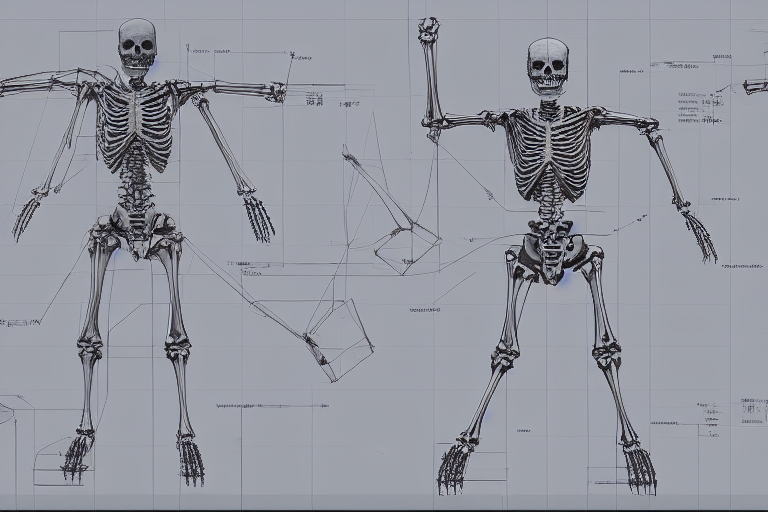
OpenPose is the most important ControlNet model for NSFW work. It detects the human skeleton from a reference image and forces the generated character to match that exact pose.
OpenPose detects body joints, hand positions, and facial landmarks. For NSFW content, the full body detection is critical. You can take any photo showing a pose you like, run it through the OpenPose preprocessor, and get a stick-figure skeleton. The AI then generates your character in that exact position.
Important tips for OpenPose:
Use reference photos where limbs are clearly visible. If arms or legs are hidden behind the body, the preprocessor guesses their position. These guesses are often wrong and create impossible anatomy.
Control weight for OpenPose should be between 0.8 and 1.2 for strong pose adherence. Below 0.6, the pose starts to drift. Above 1.3, the image can become distorted or lose quality.
Resolution matters. OpenPose works best at 512 to 768 pixels. Higher resolutions can cause joint detection errors. If you need larger images, generate at standard resolution first, then upscale.
Depth: The 3D Structure Controller
Depth maps control the spatial relationship between the character and the environment. While OpenPose controls the skeleton, Depth controls where things are in 3D space.
Depth maps are grayscale images where white means close and black means far away. The AI uses this information to place body parts correctly in the scene. This prevents floating limbs and impossible body positions.
For NSFW content, Depth is especially useful when combined with OpenPose. OpenPose gives you the pose. Depth gives you the correct spatial positioning. Together they create anatomically correct scenes.
Recommended Depth weight is 0.4 to 0.6 when combined with OpenPose. If you use Depth alone, you can go up to 0.8. Start with lower values and increase if the spatial structure is not correct.
Canny: The Edge Outline Controller
Canny edge detection extracts the outline of shapes from a reference image. It is less useful for full-body poses than OpenPose, but it has specific uses.
Use Canny when you want to preserve the exact silhouette of a pose or when you are working with line art. Canny is also useful for controlling clothing shapes and accessories that OpenPose might miss.
Canny weight typically ranges from 0.5 to 1.0. It works well as a secondary ControlNet alongside OpenPose.
Reference: The Style and Character Keeper
Reference ControlNet copies the style, colors, and general appearance from a reference image. It does not control pose like OpenPose, but it keeps the visual style consistent.
For NSFW series work, Reference is valuable. You can generate multiple images of the same character in different poses while keeping the visual style identical. Combine Reference with OpenPose for pose control and you get consistent character work across multiple scenes.
Multi-ControlNet Workflows for Perfect Results
The real power of ControlNet comes from combining multiple models. A single ControlNet gives you one type of control. Multiple ControlNets give you complete control.
The Standard NSFW Stack
The most reliable workflow for NSFW content uses two ControlNets:
ControlNet 1: OpenPose with weight 1.0. This controls the full body pose.
ControlNet 2: Depth with weight 0.5. This controls the 3D spatial structure.
This combination gives you exact pose control plus correct depth relationships. The result is anatomically accurate characters in the exact positions you want.

Advanced Three-ControlNet Setup
For maximum precision, add a third ControlNet:
ControlNet 1: OpenPose with weight 1.0 for pose.
ControlNet 2: Depth with weight 0.5 for spatial structure.
ControlNet 3: Canny with weight 0.4 for edge detail.
This stack controls pose, depth, and outline simultaneously. It is the most stable configuration for complex NSFW scenes. The drawing stability is extremely high, and it works well for multi-character scenes.
ControlNet Parameters Explained
Control Weight
Control Weight determines how strongly ControlNet influences the generation. The range is 0 to 2.
For OpenPose in NSFW work, 0.8 to 1.2 is the sweet spot. At 1.0, the pose is followed exactly. Below 0.6, the pose starts to drift and the AI takes creative freedom. Above 1.3, you risk image distortion and quality loss.
For Depth, 0.4 to 0.6 works best when combined with OpenPose. Used alone, Depth can go up to 0.8.
For Canny, 0.5 to 1.0 is typical.
Guidance Start and End
These parameters control when ControlNet starts and stops influencing the generation. The range is 0 to 1, representing the percentage of generation steps.
Start at 0 means ControlNet influences from the very beginning. This is recommended for pose control.
End at 0.75 means ControlNet stops after 75 percent of the generation steps. This lets the AI fill in details for the final 25 percent without strict control. The result is a natural-looking image that still follows your pose.
Recommended settings for NSFW: Start 0.0, End 0.7 to 0.8. This gives strong pose control while allowing the AI to add natural details at the end.
Control Mode
Control Mode has three options:
Balanced: ControlNet and your prompt have equal influence. This is the default and works for most cases.
My prompt is more important: The text prompt overrides ControlNet when they conflict. Use this if you want the pose loosely followed but care more about the prompt content.
ControlNet is more important: The pose overrides the prompt. Use this for exact pose adherence.
For NSFW work, Balanced or ControlNet is more important work best. My prompt is more important can cause pose drift.
Preprocessor Resolution
The preprocessor resolution affects how ControlNet analyzes your reference image. Higher resolution gives more detail but uses more VRAM.
512 to 768 pixels is the standard range. This is enough for accurate pose detection without excessive VRAM use. If you have a powerful GPU with 16GB or more VRAM, you can try 1024 for SDXL work.
Model Selection for NSFW ControlNet
SDXL vs SD 1.5
SDXL models require SDXL ControlNet models. SD 1.5 models require 1.5 ControlNet models. The versions are not interchangeable.
SDXL ControlNet generally produces higher quality results at 1024×1024 resolution. However, SD 1.5 ControlNet has better model availability and lower VRAM requirements.
For NSFW work in 2026, SDXL is becoming the standard. The quality improvement is significant, especially for detailed skin and fabric textures.
Recommended NSFW Checkpoints
Pony Diffusion XL and Illustrious are the top choices for NSFW content in 2026. Both have excellent anatomical accuracy and support ControlNet well.
When using these checkpoints, make sure to download the matching SDXL ControlNet models. Using the wrong version will cause errors or poor results.
Fixing Common NSFW Problems with ControlNet
Broken Hands and Limbs
OpenPose alone does not fix hands. The skeleton shows hand position but not finger details. For hand fixes, use the Inpaint plus Depth workflow.
Step 1: Generate your image with OpenPose for the body pose.
Step 2: Mask the bad hand area in img2img inpainting.
Step 3: Load a real hand photo as the Depth reference.
Step 4: Run inpainting with Depth ControlNet at denoising 0.60 to 0.70.
This method fixes finger count and joint anatomy with about 85 to 90 percent success rate.
Face Details
For face quality in NSFW images, use FaceDetailer or ADetailer after generation. These tools auto-detect faces and run an inpainting pass to refine them.
Settings: Detection model bbox face yolov8m, denoise 0.45, steps 20. Use a prompt like beautiful detailed face, clear eyes, smooth skin for the refinement pass.

Consistent Character Across Multiple Images
To keep the same character in different poses, combine Reference ControlNet with OpenPose.
Step 1: Generate your base character image.
porn ai generator
Step 2: Use that image as the Reference ControlNet input.
Step 3: Use a different pose image as the OpenPose input.
Step 4: Generate with both ControlNets active.
The result is your original character in a new pose, keeping the same face, hair, and style.
ComfyUI vs Forge: Which to Use
Forge Advantages
Forge is easier to use for beginners. The ControlNet panel is ai celebrity nudes built into the standard interface. You do not need to build node workflows. Everything is accessible through dropdown menus and sliders.
Forge also handles VRAM more efficiently. If you have 8GB to 12GB VRAM, Forge is the safer choice.
ComfyUI Advantages
ComfyUI offers complete workflow customization. You can chain multiple ControlNets, add IP-Adapter for style transfer, and build complex multi-step pipelines that are impossible in Forge.
For professional NSFW work, ComfyUI is the better long-term investment. The node system lets you automate entire workflows and create reusable templates.

VRAM and Performance Tips
ControlNet uses significant VRAM. Each active ControlNet adds about 1.5GB to your VRAM usage.
With two ControlNets active, you need at least 10GB VRAM for comfortable SDXL work. For 8GB cards, use SD 1.5 models or run one ControlNet at a time.
Performance tips:
Lower the preprocessor resolution to 512 if you run out of VRAM.
Use tiled diffusion for large images instead of generating at full resolution.
Close other applications while generating. Every megabyte of VRAM counts.
Consider upgrading to 16GB VRAM if you do professional work. The productivity gain is worth the cost.
Final Recommendations
For beginners: Start with Forge, OpenPose, and a single ControlNet. Master the basics before adding complexity.
For intermediate users: Add Depth as a second ControlNet. Experiment with guidance start and end values.
For advanced users: Move to ComfyUI. Build multi-ControlNet workflows with IP-Adapter for style control. Automate your pipeline.
The key to success with ControlNet is practice. Run test generations with different weights and settings. Document what works for your specific models and hardware. Every setup is slightly different, and finding your optimal configuration takes time.
ControlNet has transformed NSFW generation from random guessing to precise control. The technology will only improve. Master it now and you will stay ahead of the curve.